How to Join TuneLab Piano Tuner Beta on iOS


About TuneLab Piano Tuner
This app is for professional piano technicians
This is a professional tool that produces a custom piano tuning for any piano
It is part of the TuneLab line of piano tuning programs for smartphones, tablet computers and laptops that piano technicians have been using sine 2001.
Notable features:
* Measures and uses inharmonicity of the piano to construct a custom tuning.
* Provides an over-pull mode for more accurate pitch-raises.
* Can store hundreds of tuning files for individual pianos.
* Tuning files can be stored locally and in the Cloud on Dropbox.
* Provides many historical temperaments for period music.
* Switches notes automatically when you play the next note.
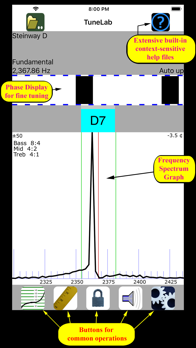
* Provides a strobe-like Phase Display for fine-tuning.
* Provides a versatile frequency spectrum display.
TuneLab lets you customize a tuning by sampling the inharmonicity for a few notes of the particular piano
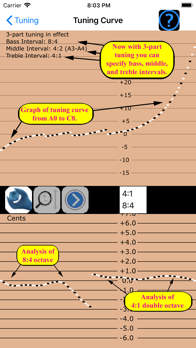
You can choose the kind of tuning stretch you want by specifying different intervals for the bass, the treble, and the mid-range of the scale
These intervals can be octaves, 12ths, double octaves, etc
Good defaults are in place if you are not sure which settings you prefer.
After a custom tuning has been created from inharmonicity measurements you can store this tuning by name
The next time you need to tune that piano, or one very much like it, you simply load that same tuning file and start tuning
There is essentially no limit to the number of tuning files that you can store
TuneLab comes with some sample tuning files and an "Average" tuning file so you can start tuning right away without bothering to measure inharmonicity.
TuneLab covers the normal piano range from A0 to C8 (88 notes)
The automatic note-switching feature makes it possible to enjoy hands-free operation
There is also easy one-touch manual note switching.
TuneLab has two different displays that are visible at the same time
One is the strobe-like Phase Display
This is a band where black squares move left or right depending on whether the note is sharp or flat
Tune the note to make the pattern stop moving
The other is the Spectrum Display
This is a graph of the frequency spectrum around the desired note that shows a peak in the audio frequency spectrum for every pitch present in the sound
The object in using this display is to tune the note until the peak in the graph is positioned at a central red line
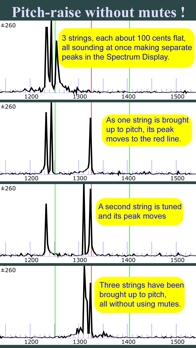
The Spectrum Display makes it possible to do a rough pitch-raise without mutes since each string of a unison produces its own peak in the graph
Having both the Phase Display and the Spectrum Display visible at the same time gives you a more complete picture of the tuning than any single spinner-type or needle-type display.