


How to Join CSB Simple Banking Beta on iOS


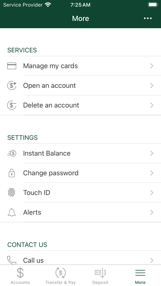

About CSB Simple Banking
Technology is meant to make life easier
Bank securely and conveniently with CSB Simple Banking
Our FREE app is available to Community State Bank customers and offers quick access for managing your CSB accounts and debit card
Use your current online banking credentials to get started or enroll through the app!
Mobile Banking Features
Manage Accounts — Monitor accounts, review current balances and past transactions.
Transfer Funds — Move money from CSB account to another.
Locate ATMs — Find an ATM near you when you’re on the go.
Manage your Debit Card — Secure, monitor and manage access to your CSB Debit Card.
Enable Touch ID and Facial Recognition — Take advantage of Apple’s Touch ID to log into your account from your iOS device.
Review Check Images — Tap the icon next to a check number to quickly view a check image.
Make Mobile Deposits — Take photos of checks to deposit them directly into your CSB accounts.
Pay Bills and People — Pay vendors and people through the app after setting up Bill Pay and Pop Money through Online Banking.
Push Notifications & Account Alerts – Setup & receive push notifications and Account Alerts through the app! Stay updated on your recent account activity and banking information.
*Must be a Community State Bank Customer and enrolled in CSB Online Banking, or bank customers may enroll in CSB Online Banking via the CSB Simple Banking App
.
**Community State Bank is Member FDIC
This application is offered by Fiserv, Inc. as the service provider
Community State Bank does not charge a fee to use CSB Simple Banking, but data rates may apply
Check with your communications service provider for details
To sign up for CSB Online Banking or view the Community State Bank Privacy Notice please visit CSB.bank.
https://csb.bank/support


