


How to Join FaceTime Beta on iOS
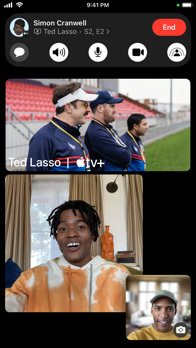


About FaceTime
Connect with family and friends around the world with FaceTime audio and video calls.
FaceTime Messages
When someone doesn’t pick up your FaceTime call, leave them a video or audio message to capture exactly what you want to say.
SharePlay
Watch videos and listen to music together with SharePlay
Synced playback and shared controls keep everyone on the same beat, and smart volume makes it easy to keep the conversation going over FaceTime while enjoying a video or song you love.
Screen sharing
Share your iPhone, iPad or Mac screen to bring your favorite apps into FaceTime
When someone is screen sharing, you can tap and draw on your screen to point out what they should do on theirs
If you need to assist more directly, you can ask for permission to remotely control their device.
Collaboration
Work on documents, presentations and more with the people on your call.
Unknown Callers list
Screened calls from unknown numbers are placed in a new area of your call list and out of your way.
FaceTime links
Invite your friends into a FaceTime call using a web link you can share anywhere
Even friends who don’t have an Apple device can join the call from their browser instantly — no login necessary.
Mic Modes
Automatic Mic Mode picks the right Mic Mode for you
Voice Isolation blocks out ambient noise and spotlights your voice
Wide Spectrum will leave ambient noises unfiltered, allowing your voice and all the sounds around you to be heard.
Portrait mode & Studio Light
Portrait mode blurs your background, while Studio Light dims the background and brightens your face.
Reactions & gestures
Layer screen effects directly into your camera feed, like balloons, confetti, stormy rain, fireworks, or laser beams
Double tap anywhere on the screen to bring up the reaction buttons, or trigger reactions using hand gestures.
Contact Posters
Create a customized poster to represent yourself when you give people a FaceTime Audio call
Choose from various treatments for photos, Memoji and your name.
Spatial audio
With spatial audio, your friends’ voices are spread out to sound like they’re coming from the direction in which they’re positioned on the call.
Grid view
Grid view lets you see people in your Group FaceTime calls in the same-size tiles, and highlights the current speaker so it’s easy to know who’s talking.
Center Stage
Center Stage uses machine learning to adjust the front-facing Ultra Wide camera during FaceTime video calls to help keep you and anyone else with you in the frame.
Video effects
Use effects to become an Animoji, place stickers, and much more right in your FaceTime call.
Handoff in FaceTime
Move FaceTime calls seamlessly from your iPhone to your Mac or iPad, and vice versa
When you hand off a call, your connected Bluetooth headset transitions to the new device simultaneously.
Handoff to FaceTime on Apple TV 4K
Connect with family and friends around the world from the comfort of your couch
Launch the FaceTime app on Apple TV to initiate a call or start on iPhone and handoff to Apple TV.
Get everyone together
Enjoy Group FaceTime calls with up to 32 people at once.
Front and back cameras
Use the front-facing FaceTime camera to show your face, or switch to the back camera to show your friends what you see or zoom in on something special.
Live Captions in FaceTime
See automatically transcribed dialogue integrated into your FaceTime video calls
With speaker attribution, it's easy to follow along with group conversations.
Flexible calling
Reach contacts using their phone number or Apple Account
FaceTime works over Wi-Fi and cellular.


